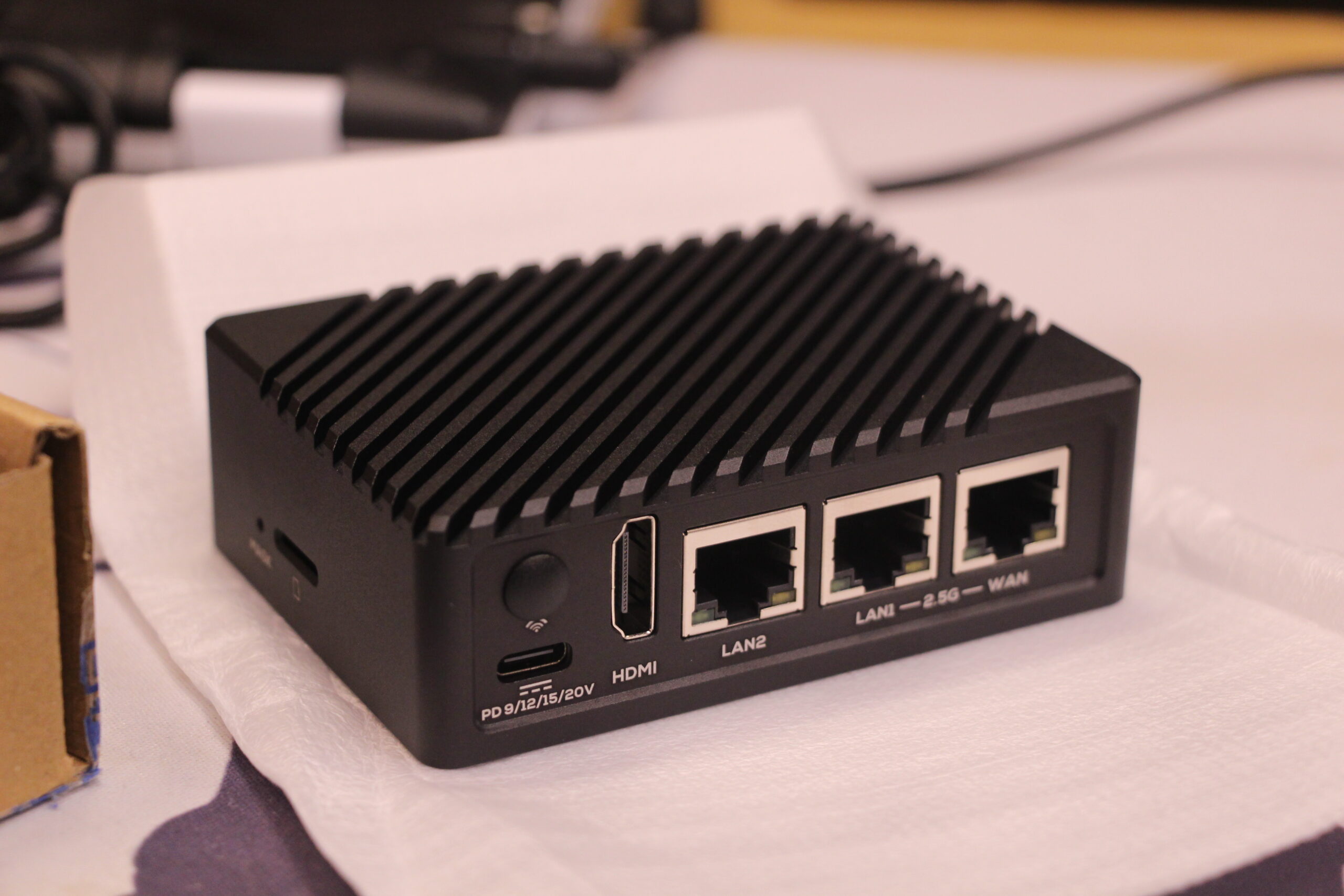
以前の記事で紹介した NanoPi R6S ですが、何かやらかしたのか Ubuntu のデスクトップが起動しなくなってしまったこと、さらに色々いじっていたら環境が壊れたこともあり、OS を入れ直すことにしました。
NanoPi の製造元である FriendlyElec が提供している OS イメージ にはいくつかあるのですが、Ubuntu は一度試したこと、実際用途上デスクトップ環境はほとんど使わないので不要なこと、その割に Ubuntu Server がないこと…と考えると、必然的に Debian 11 Bullseye の Core イメージ(CLI のみで軽量、おそらくサーバー向き)に絞られます。
FriendlyCore という Ubuntu Core の派生版イメージもありますが、どこが Ubuntu Core から変わっているのか分からないのとベースの Ubuntu が 20.04 と少し古いので、今回はやめておきました。
そもそも Ubuntu Core はコンテナ前提のシステムのはずで普段使いには向いてなさそうなのですが、ネットの記事を見ると普通に apt install できてしまっているので謎…。このあたりがカスタムされてる所以なのかも。

このあたりについて調べていると、NanoPi R5S (RK3568 SoC) で Ubuntu 22.04 をインストールしようとしている方がいました。イメージを自作する際は参考にできそうです。
今回は rk3588-sd-debian-bullseye-core-5.10-arm64-20230403.img.gz をインストールしました。CLI だけなので、ファイルサイズも 470MB と非常に小さいです。
インストール方法は以前の記事で紹介したので割愛します。今回は Windows と直接つなげてインストールしようとしたのですが、うまく認識しなかった(ケーブルが悪いのか、あるいはうまく MaskROM モードに入れていないのか…)ため、結局前と同様に MicroSD カード経由でインストールしました。
少し手間は掛かるものの、無難で安全な方法ではあります。
前の記事でも紹介しましたが、一度 OS をインストールした状態から別の OS を入れ直す場合は、MicroSD カードで起動した FriendlyWrt に SSH 接続した上で、/dev/mmcblk2p8 と /dev/mmcblk2p9 の中身を削除しておく必要があります。
削除しなくてもインストール自体はできますが、その後の動作がいろいろおかしくなるので(一度経験済み)、やめたほうが無難です…。
SSH ログイン・最低限の設定
eMMC Tools で OS を書き込んだら、LAN ケーブルを家のルーターにつなげます。
そのまま HDMI でコンソールログインしても良いのですが、私は HDMI をつなげるのが諸々面倒だったので、Advanced IP Scanner で起動中の LAN 内のデバイスをスキャンした後、それっぽいデバイスに片っ端から SSH して DHCP で自動割り当てされたローカル IP アドレスを見つけました。
NanoPi R6S に割り当てられたローカル IP アドレスを見つけたら、その IP アドレス宛に SSH しましょう。
デフォルトのユーザー名とパスワードは、Ubuntu 22.04 LTS Desktop と同様に pi です。
なお、デフォルトのホスト名は NanoPi-R6S になっています。私は変更する必要性を感じなかったので、そのままにしておきました。
apt のパッケージリポジトリの変更
FriendlyElec のイメージでは、デフォルトでパッケージリポジトリが http://mirrors.163.com/debian という中国にあるっぽい怪しいリポジトリになっています。
問題なさそうな気もしますがちょっと怖いので、Debian 公式のミラーに変更します。
sudo nano /etc/apt/sources.list
----------------------------------------------------------------
deb http://ftp.jp.debian.org/debian bullseye main contrib non-free
deb-src http://ftp.jp.debian.org/debian bullseye main contrib non-free
deb http://security.debian.org/debian-security bullseye-security main contrib non-free
deb-src http://security.debian.org/debian-security bullseye-security main contrib non-free
deb http://ftp.jp.debian.org/debian bullseye-updates main contrib non-free
deb-src http://ftp.jp.debian.org/debian bullseye-updates main contrib non-free
/etc/apt/sources.list に上記内容を書き込んでおきます。
あとあと調べたところ、www.163.com は中国国内だと有名なニュースポータルサイトのようです。
少なくとも得体の知れない運営者が管理しているわけではなさそう…?
apt パッケージの更新
sudo apt update && sudo apt upgrade -y && sudo apt autoremove -yまずはお決まりのこれを。Debian とはいえこのあたりの手順は Ubuntu と同じなのでかんたんです。
ロケール変更と日本語化
せっかくなので、日本語化と同時に JST にしておきましょう。
このあたりはちょっと Ubuntu と違うので面倒です。
sudo apt install -y locales-all manpages-ja manpages-ja-dev
sudo bash -c 'echo "ja_JP.UTF-8 UTF-8" > /etc/locale.gen'
sudo locale-gen
export LANG=ja_JP.UTF-8
export LC_ALL=ja_JP.UTF-8
sudo timedatectl set-timezone Asia/Tokyo
上記のコマンドを実行して、日本語化とロケールの変更を行います。
$ date
2023年  4月 10日 月曜日 21:52:05 JST
date コマンドの結果が日本語かつ JST になっていれば大丈夫でしょう。
ちなみにログイン時に Linux NanoPi-R6S 5.10.110 #176 SMP Fri Feb 17 20:39:34 CST 2023 aarch64 GNU/Linux って出てきますが、これは単にカーネルが Fri Feb 17 20:39:34 CST 2023 (中国時間) にビルドされた、ということだけを意味してるみたいでした。
最低限必要なツールをインストール
sudo apt install -y at build-essential ca-certificates cmake cron curl dialog ffmpeg git htop less nano net-tools ncdu perl unzip zipこの Debian 11 Bullseye イメージには本当に最小限のツールしか入っていないようで、Ubuntu ならだいたい標準装備のツール群が入っていません。このタイミングでインストールしておきます。
sudo apt install -y /opt/linux-headers-5.10.110.debまた、NanoPi R6S の公式イメージでは、Rockchip や FriendlyElec がカスタマイズした固定バージョンの独自カーネル (BSP カーネル) が採用されています。
標準ではカーネルヘッダーがインストールされていないのですが、これでは px4_drv をはじめとしたカーネルドライバをビルドする際に支障します。
ARM SoC ではこの点が問題になることが少なくないのですが、幸いにも /opt/linux-headers-5.10.110.deb に公式で Debian パッケージを置いてくれているので、それをインストールしておきましょう(カーネルバージョンに関しては公式イメージのバージョン次第で変わるかも?)。
.bashrc の編集
以前 net-tools をインストールし ifconfig が使えるようにしているのですが、どうもデフォルトでは /sbin/ 以下にインストールされる上に、/sbin/ にはパスが通っていません。
nano ~/.bashrc
------------------------------------------------
(省略)
if ! shopt -oq posix; then
  if [ -f /usr/share/bash-completion/bash_completion ]; then
    . /usr/share/bash-completion/bash_completion
  elif [ -f /etc/bash_completion ]; then
    . /etc/bash_completion
  fi
fi


# ----------------------------------------------------------------

# Alias
alias ls="ls --color=auto"
alias ll="ls --color=auto -l"
alias la="ls --color=auto -la"

# PATH
export PATH="$HOME/.local/bin:/usr/local/sbin:/usr/local/bin:/usr/sbin:/usr/bin:/sbin:/bin:/usr/games:/usr/local/games"

# oh-my-posh
eval "$(oh-my-posh --init --shell bash --config ~/.poshthemes/powerline-custom.omp.json)"

# 履歴をリアルタイムで保存/読込する
export PROMPT_COMMAND="$PROMPT_COMMAND history -a; history -r"
いいタイミングなので、ここで ~/.bashrc を編集し、パスやエイリアスを登録しておきましょう。
上記のように編集し、もう一度ログインすると適用されます。
Powerline (oh-my-posh) のインストール
個人的にいろいろなデバイスに設定しているので(入れるとコマンドラインが見やすくなる)。
v3.130.1 で固定している理由は、それ以降のバージョンだと確か文字化け?があったのと、バージョンアップと破壊的変更が多く疲れたため…。
# 本体のダウンロード
sudo wget https://github.com/JanDeDobbeleer/oh-my-posh/releases/download/v3.130.1/posh-linux-arm -O /usr/local/bin/oh-my-posh

# 実行権限の付与
sudo chmod +x /usr/local/bin/oh-my-posh

# テーマのダウンロード
mkdir ~/.poshthemes
wget https://github.com/JanDeDobbeleer/oh-my-posh/releases/download/v3.130.1/themes.zip -O ~/.poshthemes/themes.zip
unzip ~/.poshthemes/themes.zip -d ~/.poshthemes
chmod u+rw ~/.poshthemes/*.json
rm ~/.poshthemes/themes.zip

# 個人的に自作したカスタムテーマのダウンロード
wget https://gist.githubusercontent.com/tsukumijima/14354560ee91739a9d3e2238c1f03f91/raw/38db4c79e66252a736b3f7926d45fc07f3fcdff6/powerline-custom.omp.json -O ~/.poshthemes/powerline-custom.omp.json

# 背景色を変更する (#1689B1 -> 任意の色)
nano ~/.poshthemes/powerline-custom.omp.json
SSH をパスワード認証から公開鍵認証に変更する
デフォルトで SSH はパスワード認証になっていますが、毎回パスワードを入力するのがめんどくさいので、公開鍵認証に変更します。ついでに個人的に SSH のポートはすべて 10022 に統一しているので、それもやっておきます。
この作業たまにしかやらないので忘れがちなのですが、ChatGPT (GPT-4) に訊いたらドンピシャな手順を示してくれたのでそのまま貼っておきます。技術ブログの必要性…。
# Windows の場合は WSL 環境に入っておかないとうまく実行できないので注意
$ bash
$ pwd
/mnt/c/Users/User

# クライアント側でSSHキーペア(公開鍵と秘密鍵)を生成する
$ ssh-keygen -t rsa -b 4096 -f .ssh/NanoPi-R6S

# 生成された公開鍵を NanoPi R6S 側にコピーする (このコマンド ChatGPT に教えてもらうまで知らなかった…)
$ ssh-copy-id -i .ssh/NanoPi-R6S.pub [email protected]

# 最後に秘密鍵ファイルを pem にリネーム (個人的に拡張子があった方がなんとなく好きなので)
$ mv .ssh/NanoPi-R6S .ssh/NanoPi-R6S.pem

# WSL 環境を出る
exit

# NanoPi R6S に SSH でログインし、SSH 設定ファイルを下記のとおり編集
ssh [email protected]
sudo nano /etc/ssh/sshd_config
-------------------------------------------------------
#Port 22
Port 10022
...
#PubkeyAuthentication yes
PubkeyAuthentication yes
PasswordAuthentication no
-------------------------------------------------------

# 編集が完了したら、ファイルを保存して閉じる
# 次に、SSH サービスを再起動して設定を適用する
sudo service ssh restart
ここまで来たら、後は下記のように SSH で公開鍵ログインするだけです。
ssh -p 10022 -i ~/.ssh/NanoPi-R6S.pem [email protected]ただ毎回入力するのは面倒なので、~/.ssh/config に設定を追記しておきましょう。
Host NanoPi-R6S
  HostName 192.168.1.59
  Port 10022
  User pi
  IdentityFile ~/.ssh/NanoPi-R6S.pem
  TCPKeepAlive yes
  IdentitiesOnly yes
こうしておけば、次回以降は ssh NanoPi-R6S だけで SSH ログインできるようになります!
そのほかのあった方が良いソフトをインストール
neofetch
sudo apt install -y neofetch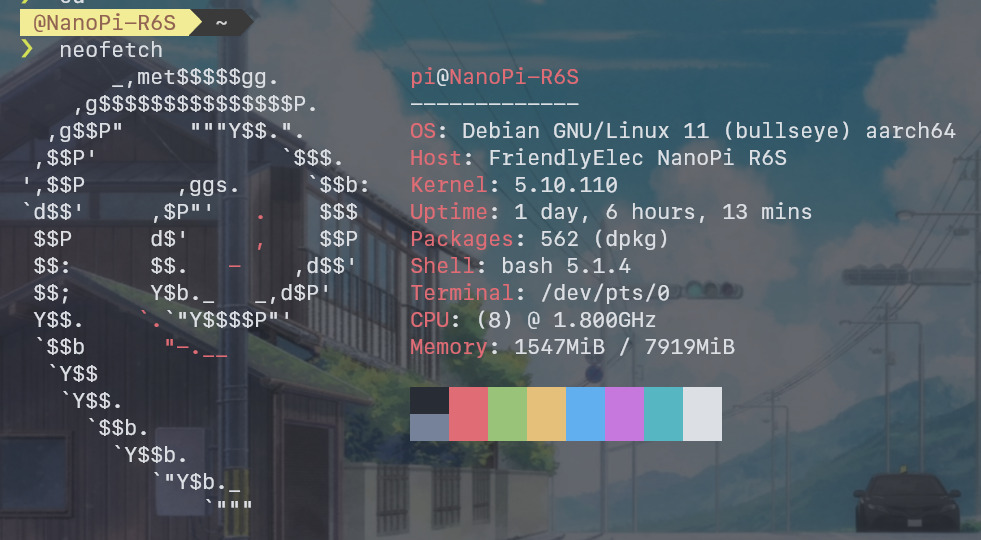
インストールしておくと、このような画面を出せる。ただそれだけ。
avahi-daemon / samba
sudo apt install -y avahi-daemon sambaavahi-daemon は mDNS サービス(?)で、インストールしておくと nanopi-r6s.local のドメインで NanoPi R6S で起動中の各サーバーにアクセスできるようになります。ラズパイの Raspbian (Raspberry Pi OS) には最初からインストールされています。
たとえば NanoPi-R6S に Apache をインストールしている場合、ローカル LAN 内なら http://nanopi-r6s.local/ で Apache の HTTP ページにアクセスできるはずです。
一方の Samba は言わずとしれた SMB ファイル共有サーバーです。手元にあるディレクトリを Windows のネットワークドライブとしてネットワーク経由で共有できます。
sudo nano /etc/samba/smb.conf
------------------------------------------------------------------------
# ↓↓↓↓↓ コメントアウト
;[homes]
;   comment = Home Directories
;   browseable = no

# By default, the home directories are exported read-only. Change the
# next parameter to 'no' if you want to be able to write to them.
;   read only = yes

# File creation mask is set to 0700 for security reasons. If you want to
# create files with group=rw permissions, set next parameter to 0775.
;   create mask = 0700

# Directory creation mask is set to 0700 for security reasons. If you want to
# create dirs. with group=rw permissions, set next parameter to 0775.
;   directory mask = 0700

# By default, \\server\username shares can be connected to by anyone
# with access to the samba server.
# The following parameter makes sure that only "username" can connect
# to \\server\username
# This might need tweaking when using external authentication schemes
;   valid users = %S
# ↑↑↑↑↑ コメントアウト

# ↓↓↓↓↓ コメントアウト
;[printers]
;   comment = All Printers
;   browseable = no
;   path = /var/spool/samba
;   printable = yes
;   guest ok = no
;   read only = yes
;   create mask = 0700

# Windows clients look for this share name as a source of downloadable
# printer drivers
;[print$]
;   comment = Printer Drivers
;   path = /var/lib/samba/printers
;   browseable = yes
;   read only = yes
;   guest ok = no
# ↑↑↑↑↑ コメントアウト
# Uncomment to allow remote administration of Windows print drivers.
# You may need to replace 'lpadmin' with the name of the group your
# admin users are members of.
# Please note that you also need to set appropriate Unix permissions
# to the drivers directory for these users to have write rights in it
;   write list = root, @lpadmin

# ↓↓↓↓↓ 追記
[NanoPi-R6S]
   # 共有するフォルダのパス
   path = /
   # 書き込みを許可する
   writable = yes
   # 強制的に利用する UNIX ユーザーの名前
   force user = pi
   # ファイル/ディレクトリの書き込みモード
   force create mode = 0644
   force directory mode = 0755
インストール後、smb.conf を編集して、上記のように変更しておきましょう。
sudo smbpasswd -a piまた、Samba のユーザーと Linux のユーザーは微妙に概念が分かれているようで、別途 Samba のユーザーにパスワードを設定する必要があります。
上記コマンドで設定しておきましょう。私は Linux ユーザーの方と同じく同じく pi にしておきました(短すぎる気もしますが…)。
sudo service smbd restart && sudo service nmbd restartあとはサービスを再起動すれば、Windows から \\nanopi-r6s.local として NanoPi R6S のファイルシステムにアクセスできるようになります…!
パーミッションの関係で pi ユーザーでは /etc/ などシステムフォルダには読み取り専用ですが、/home/pi/ 以下であればメイン PC とのファイルの受け渡しが容易になるので、たとえば NanoPi R6S で生成したデータをメイン PC で見たり、逆にメイン PC で作成したデータを NanoPi R6S に送ったりが scp を使わずとも簡単にできるようになり、とても便利です。
speedtest
この NanoPi R6S は 2.5GbE の有線 LAN に対応していることがウリなので(もともとルーター用がメインだし…)、ネット回線の速度は測れるようにしておきたいところです。
この手の回線速度測定ツールはいくつかありますが、ここでは speedtest.net が公式に提供している CLI をインストールしてみます。
curl -fsSL https://packagecloud.io/ookla/speedtest-cli/gpgkey | sudo gpg --dearmor -o /usr/share/keyrings/ookla_speedtest-cli-archive-keyring.gpg
echo 'deb [signed-by=/usr/share/keyrings/ookla_speedtest-cli-archive-keyring.gpg] https://packagecloud.io/ookla/speedtest-cli/debian/ bullseye main' | sudo tee /etc/apt/sources.list.d/ookla_speedtest-cli.list > /dev/null
sudo apt update
sudo apt install -y speedtest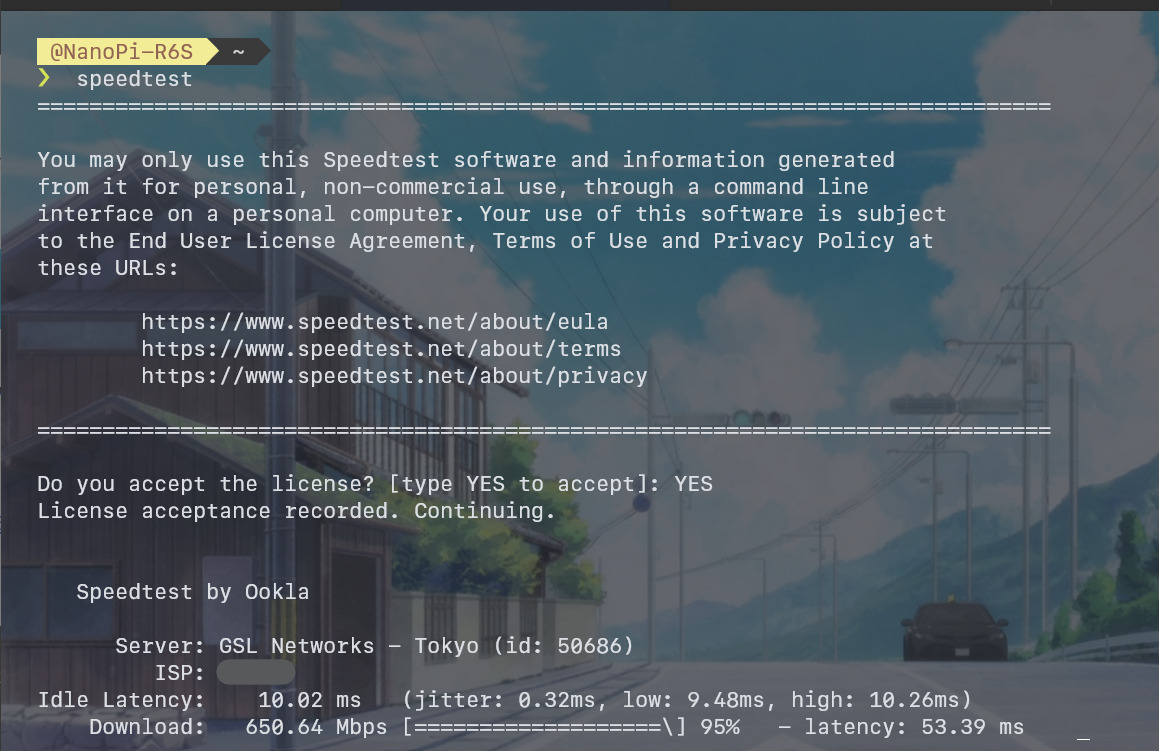
最初に実行すると初回のみライセンスの同意を求められるので、YES を入力します。
その後、すぐに速度計測が実行されます。私の環境だと最高で下り 700Mbps 以上は出るみたいでした(もちろんネット回線が高速な環境ではもっと出るでしょう)。
この speedtest の CLI 版は毎回サーバーをランダムで選定して通信テストをするのですが、サーバーによってはパケロスが酷いこともあります。少し速度が落ちますが、単にパケロスを避けたいのであれば speedtest -s 24333 で楽天モバイルのサーバーを指定するのがおすすめです。
Tailscale
以前このブログでも紹介した Tailscale VPN 。私の手元のデバイスは原則すべて Tailscale ネットワークに入れて相互に通信できるようにしているので、NanoPi R6S も Tailscale につなげておきたいところです。
curl -fsSL https://tailscale.com/install.sh | sh以前はインストールする際に apt の sources.list.d に入れたりが必要だったのですが、今は上記の1コマンドでインストールできるようになったようで、便利になったものです(慣れていれば別に Manual Install でもさして手間ではないのですが)。
$ sudo tailscale up

To authenticate, visit:

        https://login.tailscale.com/a/xxxxxxxxxxxxx

Success.
インストールできたら、あとは上記のコマンドで表示される URL をブラウザで開き Tailscale にログインするだけで、自動的に Tailscale のネットワークに接続されます。本当に簡単で良き…。
長期間サーバーとして使う場合は、Disable Key Expires でログインの有効期限を無効化しておくことをお忘れなく。デフォルトだと半年で再ログインが必要になるようです。
Docker のインストール
あんまり使わなさそうな気もしますが、一応 Docker をインストールしてみます。
# GPG 鍵のインポート
curl -fsSL https://download.docker.com/linux/ubuntu/gpg | sudo gpg --dearmor -o /usr/share/keyrings/docker-archive-keyring.gpg

# パッケージリストの登録
cat <<EOF | sudo tee /etc/apt/sources.list.d/docker.list > /dev/null
deb [arch=$(dpkg --print-architecture) signed-by=/usr/share/keyrings/docker-archive-keyring.gpg] https://download.docker.com/linux/debian $(lsb_release -cs) stable
EOF

# Docker Engine のインストール
sudo apt update
sudo apt install -y docker-ce docker-ce-cli containerd.io docker-buildx-plugin docker-compose-plugin

# Docker を sudo をつけなくても操作できるように
# sudo をつけなくても Docker を実行させたいユーザーを docker グループに追加すればいいらしい
# ref: https://docs.docker.com/engine/install/linux-postinstall/
sudo usermod -aG docker pi

# 一度ログアウトしてからログインすれば sudo をつけなくても docker にアクセスできるようになる
exit
手順は上記の通り。

インストール手順は基本的には公式ガイドに準じますが、keyring の配置はほかのソフトがだいたい /usr/share/keyrings/ に保存しているので、そっちに統一しています(バランスを取らなくっちゃなァ!)。どっちに保存しようが問題なく動きます。
$ docker version
Client: Docker Engine - Community
 Version:           23.0.3
 API version:       1.42
 Go version:        go1.19.7
 Git commit:        3e7cbfd
 Built:             Tue Apr  4 22:02:03 2023
 OS/Arch:           linux/arm64
 Context:           default

Server: Docker Engine - Community
 Engine:
  Version:          23.0.3
  API version:      1.42 (minimum version 1.12)
  Go version:       go1.19.7
  Git commit:       59118bf
  Built:            Tue Apr  4 22:02:03 2023
  OS/Arch:          linux/arm64
  Experimental:     false
 containerd:
  Version:          1.6.20
  GitCommit:        2806fc1057397dbaeefbea0e4e17bddfbd388f38
 runc:
  Version:          1.1.5
  GitCommit:        v1.1.5-0-gf19387a
 docker-init:
  Version:          0.19.0
  GitCommit:        de40ad0

$ docker compose version
Docker Compose version v2.17.2
Docker と Docker Compose それぞれのバージョンを確認できたら完了です。
ちなみに docker-compose コマンドは最近 docker compose コマンド (Docker Compose V2) として統合されたので、別途インストールする必要はありません。Docker Compose V1 はそろそろ廃止されるはず…。
rkmppenc でハードウェアエンコード

rkmppenc は QSVEnc や NVEnc で知られる rigaya さんが最近開発された、RK3588 をはじめとした Rockchip 製 SoC に搭載されているハードウェアデコーダー/エンコーダーを利用して、ハードウェアで高速に動画のエンコードができる素晴らしい CLI ツールです。
CLI 動画変換ソフトといえばみんな大好き FFmpeg です。しかし、FFmpeg は今のところ Rockchip SoC の HW エンコーダーをサポートしていません。HW デコードだけなら一応できるのですが…。
HW デコードだけできてもあまり恩恵ないのでは…?と思ったのですが、どうやら Kodi や VLC などのメディアプレイヤーソフトは動画のデコードに FFmpeg に含まれる映像処理ライブラリの libav (libavcodec など) を利用しているらしく、Rockchip SoC デバイスで動画を再生する際に、libav で HW デコードがサポートされていると CPU を使わずに高速にデコードできて都合が良いみたいです。
一応 HW エンコードに対応させたフォーク もあるにはありますが、少なくとも日本のテレビ放送の録画データ (MPEG-2 Video な MPEG-2 TS) を H.264 / H.265 にトランスコードする用途ではまったく使い物にならなかった…。
一方 rkmppenc を使えば、Rockchip SoC でもほかの QSVEnc シリーズなどと同じようなコマンドライン体系で、高速に動画のハードウェアエンコードができるようになります…!
ラズパイ4以外の ARM SBC (シングルボードコンピューター) でまともに日本のテレビ録画 TS をエンコードできるものは今まで存在しなかったのですが、rkmppenc の登場で世界が変わりました。
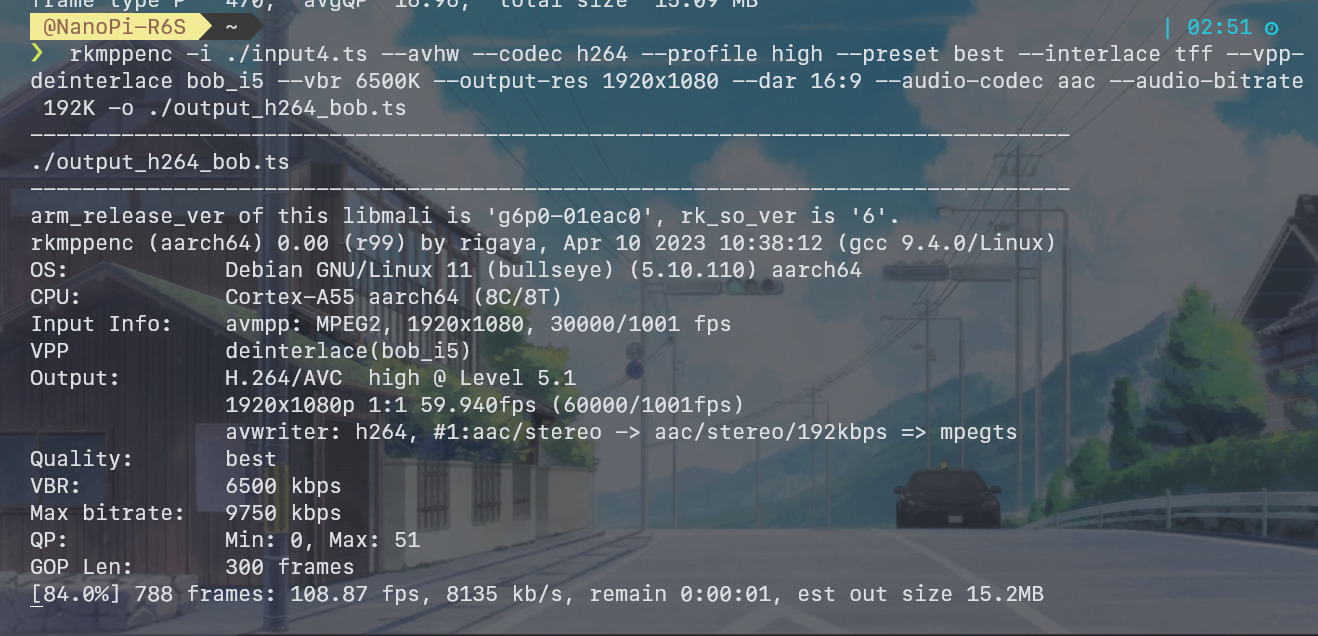
デインタレースやリサイズも HW 機能をフル活用してエンコードしてくれるので、CPU をほとんど使わずに、60~80fps 程度で高速にトランスコードできます。MPEG-2 → H.264/H.265 だと少し遅いのですが、H.264 → H.264 であれば 400fps 程度も出るようです。
ちなみに(長らく入手困難な)ラズパイ4は、yadif でデインタレースした上だと HW エンコードでもフル HD 映像をリアルタイムエンコードできないくらいの性能だそうで、いかに RK3588 と Rockchip SoC 内蔵の HW エンコーダーの性能が高いかがよく分かります。
もっとも、ラズパイ4にはライセンスだかの事情で MPEG-2 の HW デコーダーが搭載されていないので(= SW デコード + HW エンコード)比較するのもかわいそうですが…。
rkmppenc が開発されたことで、NanoPi R6S などのRK3588 搭載 SBC は録画サーバーとしてもかなり使えるものになったのでは? 少なくともラズパイ4 (H.265 ハードウェアエンコーダー非搭載) やラズパイ5 (ハードウェアエンコーダー完全非搭載) よりもかなり有望そうに見えます。
インストール手順
# Rockchip MPP のインストール
## 2026年1月追記: rockchip-linux/mpp とそのフォークは LGPL 違反だとかで DMCA されてしまったので、
## ライセンス問題が修正された HermanChen/mpp からフォークしたリポジトリにてビルド済み .deb ファイルを公開している
wget https://github.com/tsukumijima/mpp-rockchip/releases/download/v1.5.0-1-20250110-194af18/librockchip-mpp1_1.5.0-1_arm64.deb
sudo apt install -y --allow-downgrades ./librockchip-mpp1_1.5.0-1_arm64.deb
rm librockchip-mpp1_1.5.0-1_arm64.deb

# librga のインストール
wget https://github.com/tsukumijima/librga-rockchip/releases/download/v2.2.0-1-20260105-bfd411b/librga2_2.2.0-1_arm64.deb
sudo apt install -y --allow-downgrades ./librga2_2.2.0-1_arm64.deb
rm librga2_2.2.0-1_arm64.deb

# Mali GPU Driver のインストール (RK3588/RK3588S 向け)
## --vpp-yadif などの OpenCL フィルタの利用に必要
## Debian 11 Bullseye Core イメージにはデフォルトではインストールされていない
## 他の Rockchip SoC の Mali GPU Driver は https://github.com/tsukumijima/libmali-rockchip/releases から入手できる
## 2026年1月追記: v1.9-1-3238416 よりも後のバージョンは glibc 2.34 でビルドされているため、
## glibc 2.31 を持つ Debian 11 Bullseye では v1.9-1-3238416 までしかインストールできない (!!!)
wget https://github.com/tsukumijima/libmali-rockchip/releases/download/v1.9-1-3238416/libmali-valhall-g610-g13p0-wayland-gbm_1.9-1_arm64.deb
sudo apt install -y --allow-downgrades ./libmali-valhall-g610-g13p0-wayland-gbm_1.9-1_arm64.deb
rm libmali-valhall-g610-g13p0-wayland-gbm_1.9-1_arm64.deb

# rockchip-multimedia-config のインストール
## Rockchip のハードウェアエンコーダーを有効化するための設定パッケージ
wget https://github.com/tsukumijima/rockchip-multimedia-config/releases/download/v1.0.2-1/rockchip-multimedia-config_1.0.2-1_all.deb
sudo apt install -y ./rockchip-multimedia-config_1.0.2-1_all.deb
rm rockchip-multimedia-config_1.0.2-1_all.deb

# rkmppenc のインストール
## できるだけ最新版のインストールを推奨
## 最新版の deb パッケージは https://github.com/rigaya/rkmppenc/releases から確認できる
wget https://github.com/rigaya/rkmppenc/releases/download/0.17/rkmppenc_0.17_Ubuntu20.04_arm64.deb
sudo apt install -y --allow-downgrades ./rkmppenc_0.17_Ubuntu20.04_arm64.deb
rm rkmppenc_0.17_Ubuntu20.04_arm64.deb
インストール方法は上記のドキュメントに準じます。
2026年1月年現在、この環境では上記バージョンの組み合わせで動作を確認しています。
なお、rkmppenc を更新する際は、librockchip-mpp1 や librga2 の更新も必要になる場合があります。
rkmppenc のビルド時に使われた mpp や librga とは異なるバージョンがインストールされていると、正常に動作しないケースがあるようです。
実際に、2026年1月現在最新の rkmppenc 0.17 では、ドキュメントでも指定されている このコミット よりも新しいバージョンの mpp をインストールすると、謎のログやエラーが出て正常に動作しないことを確認しています。
mpp 自体がローリングリリース(?)なようで破壊的変更が頻繁に行われているのかもしれません。librga は比較的安定しているようです。
なお、KonomiTV をお使いの場合は、インストール・アップデート時にダウンロードされるサードパーティーライブラリ内に rkmppenc / mpp / librga が全て含まれているため、上記問題を気にする必要はありません。
libmali のみはユーザーモードドライバのため各自で導入が必要ですが、OpenCL フィルタを使わないのであれば、libmali のインストールも不要と思われます。
$ sudo apt install -y clinfo
$ clinfo
arm_release_ver: g13p0-01eac0, rk_so_ver: 11
Number of platforms 1
Platform Name ARM Platform
Platform Vendor ARM
Platform Version OpenCL 3.0 v1.g13p0-01eac0.11addb9882ee8209dc0912af75110af7
Platform Profile FULL_PROFILE
Platform Extensions cl_khr_global_int32_base_atomics cl_khr_global_int32_extended_atomics cl_khr_local_int32_base_atomics cl_khr_local_int32_extended_atomics cl_khr_byte_addressable_store cl_khr_3d_image_writes cl_khr_int64_base_atomics cl_khr_int64_extended_atomics cl_khr_fp16 cl_khr_icd cl_khr_egl_image cl_khr_image2d_from_buffer cl_khr_depth_images cl_khr_subgroups cl_khr_subgroup_extended_types cl_khr_subgroup_non_uniform_vote cl_khr_subgroup_ballot cl_khr_subgroup_non_uniform_arithmetic cl_khr_subgroup_shuffle cl_khr_subgroup_shuffle_relative cl_khr_subgroup_clustered_reduce cl_khr_subgroup_rotate cl_khr_il_program cl_khr_priority_hints cl_khr_create_command_queue cl_khr_spirv_no_integer_wrap_decoration cl_khr_extended_versioning cl_khr_device_uuid cl_khr_suggested_local_work_size cl_khr_extended_bit_ops cl_khr_integer_dot_product cl_khr_semaphore cl_khr_external_semaphore cl_khr_external_semaphore_sync_fd cl_khr_command_buffer cl_arm_core_id cl_arm_printf cl_arm_non_uniform_work_group_size cl_arm_import_memory cl_arm_import_memory_dma_buf cl_arm_import_memory_host cl_arm_integer_dot_product_int8 cl_arm_integer_dot_product_accumulate_int8 cl_arm_integer_dot_product_accumulate_saturate_int8 cl_arm_scheduling_controls cl_arm_controlled_kernel_termination cl_ext_cxx_for_opencl cl_ext_image_tiling_control cl_ext_image_requirements_info cl_ext_image_from_buffer
Platform Extensions with Version cl_khr_global_int32_base_atomics 0x400000 (1.0.0)
cl_khr_global_int32_extended_atomics 0x400000 (1.0.0)
cl_khr_local_int32_base_atomics 0x400000 (1.0.0)
cl_khr_local_int32_extended_atomics 0x400000 (1.0.0)
cl_khr_byte_addressable_store 0x400000 (1.0.0)
cl_khr_3d_image_writes 0x400000 (1.0.0)
cl_khr_int64_base_atomics 0x400000 (1.0.0)
cl_khr_int64_extended_atomics 0x400000 (1.0.0)
cl_khr_fp16 0x400000 (1.0.0)
cl_khr_icd 0x400000 (1.0.0)
cl_khr_egl_image 0x400000 (1.0.0)
cl_khr_image2d_from_buffer 0x400000 (1.0.0)
cl_khr_depth_images 0x400000 (1.0.0)
cl_khr_subgroups 0x400000 (1.0.0)
cl_khr_subgroup_extended_types 0x400000 (1.0.0)
cl_khr_subgroup_non_uniform_vote 0x400000 (1.0.0)
cl_khr_subgroup_ballot 0x400000 (1.0.0)
cl_khr_subgroup_non_uniform_arithmetic 0x400000 (1.0.0)
cl_khr_subgroup_shuffle 0x400000 (1.0.0)
cl_khr_subgroup_shuffle_relative 0x400000 (1.0.0)
cl_khr_subgroup_clustered_reduce 0x400000 (1.0.0)
cl_khr_subgroup_rotate 0x400000 (1.0.0)
cl_khr_il_program 0x400000 (1.0.0)
cl_khr_priority_hints 0x400000 (1.0.0)
cl_khr_create_command_queue 0x400000 (1.0.0)
cl_khr_spirv_no_integer_wrap_decoration 0x400000 (1.0.0)
cl_khr_extended_versioning 0x400000 (1.0.0)
cl_khr_device_uuid 0x400000 (1.0.0)
cl_khr_suggested_local_work_size 0x400000 (1.0.0)
cl_khr_extended_bit_ops 0x400000 (1.0.0)
cl_khr_integer_dot_product 0x800000 (2.0.0)
cl_khr_semaphore 0x9000 (0.9.0)
cl_khr_external_semaphore 0x9000 (0.9.0)
cl_khr_external_semaphore_sync_fd 0x9000 (0.9.0)
cl_khr_command_buffer 0x9000 (0.9.0)
cl_arm_core_id 0x400000 (1.0.0)
cl_arm_printf 0x400000 (1.0.0)
cl_arm_non_uniform_work_group_size 0x400000 (1.0.0)
cl_arm_import_memory 0x400000 (1.0.0)
cl_arm_import_memory_dma_buf 0x400000 (1.0.0)
cl_arm_import_memory_host 0x400000 (1.0.0)
cl_arm_integer_dot_product_int8 0x400000 (1.0.0)
cl_arm_integer_dot_product_accumulate_int8 0x400000 (1.0.0)
cl_arm_integer_dot_product_accumulate_saturate_int8 0x400000 (1.0.0)
cl_arm_scheduling_controls 0x4000 (0.4.0)
cl_arm_controlled_kernel_termination 0x400000 (1.0.0)
cl_ext_cxx_for_opencl 0x400000 (1.0.0)
cl_ext_image_tiling_control 0x1000 (0.1.0)
cl_ext_image_requirements_info 0x5000 (0.5.0)
cl_ext_image_from_buffer 0x400000 (1.0.0)
Platform Numeric Version 0xc00000 (3.0.0)
Platform Extensions function suffix ARM
Platform Host timer resolution 1ns
Platform Name ARM Platform
Number of devices 1
Device Name Mali-G610 r0p0
Device Vendor ARM
Device Vendor ID 0xa8670000
Device Version OpenCL 3.0 v1.g13p0-01eac0.11addb9882ee8209dc0912af75110af7
Device UUID 000067a8-0100-0000-0000-000000000000
Driver UUID 81aa009d-3bc6-110b-554f-92a6b707d260
Valid Device LUID No
Device LUID 0000-000000000000
Device Node Mask 0
Device Numeric Version 0xc00000 (3.0.0)
Driver Version 3.0
Device OpenCL C Version OpenCL C 3.0 v1.g13p0-01eac0.11addb9882ee8209dc0912af75110af7
Device OpenCL C all versions OpenCL C 0x400000 (1.0.0)
OpenCL C 0x401000 (1.1.0)
OpenCL C 0x402000 (1.2.0)
OpenCL C 0x800000 (2.0.0)
OpenCL C 0xc00000 (3.0.0)
Device OpenCL C features __opencl_c_images 0x400000 (1.0.0)
__opencl_c_int64 0x400000 (1.0.0)
__opencl_c_3d_image_writes 0x402000 (1.2.0)
__opencl_c_atomic_order_acq_rel 0x800000 (2.0.0)
__opencl_c_atomic_order_seq_cst 0x800000 (2.0.0)
__opencl_c_atomic_scope_device 0x800000 (2.0.0)
__opencl_c_atomic_scope_all_devices 0x800000 (2.0.0)
__opencl_c_device_enqueue 0x800000 (2.0.0)
__opencl_c_generic_address_space 0x800000 (2.0.0)
__opencl_c_pipes 0x800000 (2.0.0)
__opencl_c_program_scope_global_variables 0x800000 (2.0.0)
__opencl_c_read_write_images 0x800000 (2.0.0)
__opencl_c_subgroups 0x800000 (2.0.0)
__opencl_c_work_group_collective_functions 0x800000 (2.0.0)
Device C++ for OpenCL Numeric Version 0x400000 (1.0.0)
Latest comfornace test passed v2021-03-05-00
Device Type GPU
Device Profile FULL_PROFILE
Device Available Yes
Compiler Available Yes
Linker Available Yes
Max compute units 4
Available core IDs 0, 2, 16, 18
Max clock frequency 1000MHz
Device Partition (core)
Max number of sub-devices 0
Supported partition types None
Supported affinity domains (n/a)
Max work item dimensions 3
Max work item sizes 1024x1024x1024
Max work group size 1024
Preferred work group size multiple (device) 16
Preferred work group size multiple (kernel) 16
Max sub-groups per work group 64
Preferred / native vector sizes
char 16 / 4
short 8 / 2
int 4 / 1
long 2 / 1
half 8 / 2 (cl_khr_fp16)
float 4 / 1
double 0 / 0 (n/a)
Half-precision Floating-point support (cl_khr_fp16)
Denormals Yes
Infinity and NANs Yes
Round to nearest Yes
Round to zero Yes
Round to infinity Yes
IEEE754-2008 fused multiply-add Yes
Support is emulated in software No
Single-precision Floating-point support (core)
Denormals Yes
Infinity and NANs Yes
Round to nearest Yes
Round to zero Yes
Round to infinity Yes
IEEE754-2008 fused multiply-add Yes
Support is emulated in software No
Correctly-rounded divide and sqrt operations No
Double-precision Floating-point support (n/a)
Address bits 64, Little-Endian
Global memory size 8297439232 (7.728GiB)
Error Correction support No
Max memory allocation 8297439232 (7.728GiB)
Unified memory for Host and Device Yes
Shared Virtual Memory (SVM) capabilities (core)
Coarse-grained buffer sharing Yes
Fine-grained buffer sharing No
Fine-grained system sharing No
Atomics No
Minimum alignment for any data type 128 bytes
Alignment of base address 1024 bits (128 bytes)
Preferred alignment for atomics
SVM 0 bytes
Global 0 bytes
Local 0 bytes
Atomic memory capabilities relaxed, acquire/release, sequentially-consistent, work-item scope, work-group scope, device scope, all-devices scope
Atomic fence capabilities relaxed, acquire/release, sequentially-consistent, work-item scope, work-group scope, device scope, all-devices scope
Max size for global variable 65536 (64KiB)
Preferred total size of global vars 0
Global Memory cache type Read/Write
Global Memory cache size 1048576 (1024KiB)
Global Memory cache line size 64 bytes
Image support Yes
Max number of samplers per kernel 16
Max size for 1D images from buffer 65536 pixels
Max 1D or 2D image array size 2048 images
Base address alignment for 2D image buffers 32 bytes
Pitch alignment for 2D image buffers 64 pixels
Max 2D image size 65536x65536 pixels
Max 3D image size 65536x65536x65536 pixels
Max number of read image args 128
Max number of write image args 64
Max number of read/write image args 64
Pipe support Yes
Max number of pipe args 16
Max active pipe reservations 1
Max pipe packet size 1024
Local memory type Global
Local memory size 32768 (32KiB)
Max number of constant args 128
Max constant buffer size 8297439232 (7.728GiB)
Generic address space support Yes
Max size of kernel argument 1024
Queue properties (on host)
Out-of-order execution Yes
Profiling Yes
Device enqueue capabilities supported, replaceable default queue
Queue properties (on device)
Out-of-order execution Yes
Profiling Yes
Preferred size 2097152 (2MiB)
Max size 16777216 (16MiB)
Max queues on device 1
Max events on device 1024
Prefer user sync for interop No
Profiling timer resolution 1000ns
Execution capabilities
Run OpenCL kernels Yes
Run native kernels No
Non-uniform work-groups Yes
Work-group collective functions Yes
Sub-group independent forward progress Yes
IL version SPIR-V_1.0
ILs with version SPIR-V 0x400000 (1.0.0)
printf() buffer size 1048576 (1024KiB)
Built-in kernels (n/a)
Built-in kernels with version (n/a)
Device Extensions cl_khr_global_int32_base_atomics cl_khr_global_int32_extended_atomics cl_khr_local_int32_base_atomics cl_khr_local_int32_extended_atomics cl_khr_byte_addressable_store cl_khr_3d_image_writes cl_khr_int64_base_atomics cl_khr_int64_extended_atomics cl_khr_fp16 cl_khr_icd cl_khr_egl_image cl_khr_image2d_from_buffer cl_khr_depth_images cl_khr_subgroups cl_khr_subgroup_extended_types cl_khr_subgroup_non_uniform_vote cl_khr_subgroup_ballot cl_khr_subgroup_non_uniform_arithmetic cl_khr_subgroup_shuffle cl_khr_subgroup_shuffle_relative cl_khr_subgroup_clustered_reduce cl_khr_subgroup_rotate cl_khr_il_program cl_khr_priority_hints cl_khr_create_command_queue cl_khr_spirv_no_integer_wrap_decoration cl_khr_extended_versioning cl_khr_device_uuid cl_khr_suggested_local_work_size cl_khr_extended_bit_ops cl_khr_integer_dot_product cl_khr_semaphore cl_khr_external_semaphore cl_khr_external_semaphore_sync_fd cl_khr_command_buffer cl_arm_core_id cl_arm_printf cl_arm_non_uniform_work_group_size cl_arm_import_memory cl_arm_import_memory_dma_buf cl_arm_import_memory_host cl_arm_integer_dot_product_int8 cl_arm_integer_dot_product_accumulate_int8 cl_arm_integer_dot_product_accumulate_saturate_int8 cl_arm_scheduling_controls cl_arm_controlled_kernel_termination cl_ext_cxx_for_opencl cl_ext_image_tiling_control cl_ext_image_requirements_info cl_ext_image_from_buffer
Device Extensions with Version cl_khr_global_int32_base_atomics 0x400000 (1.0.0)
cl_khr_global_int32_extended_atomics 0x400000 (1.0.0)
cl_khr_local_int32_base_atomics 0x400000 (1.0.0)
cl_khr_local_int32_extended_atomics 0x400000 (1.0.0)
cl_khr_byte_addressable_store 0x400000 (1.0.0)
cl_khr_3d_image_writes 0x400000 (1.0.0)
cl_khr_int64_base_atomics 0x400000 (1.0.0)
cl_khr_int64_extended_atomics 0x400000 (1.0.0)
cl_khr_fp16 0x400000 (1.0.0)
cl_khr_icd 0x400000 (1.0.0)
cl_khr_egl_image 0x400000 (1.0.0)
cl_khr_image2d_from_buffer 0x400000 (1.0.0)
cl_khr_depth_images 0x400000 (1.0.0)
cl_khr_subgroups 0x400000 (1.0.0)
cl_khr_subgroup_extended_types 0x400000 (1.0.0)
cl_khr_subgroup_non_uniform_vote 0x400000 (1.0.0)
cl_khr_subgroup_ballot 0x400000 (1.0.0)
cl_khr_subgroup_non_uniform_arithmetic 0x400000 (1.0.0)
cl_khr_subgroup_shuffle 0x400000 (1.0.0)
cl_khr_subgroup_shuffle_relative 0x400000 (1.0.0)
cl_khr_subgroup_clustered_reduce 0x400000 (1.0.0)
cl_khr_subgroup_rotate 0x400000 (1.0.0)
cl_khr_il_program 0x400000 (1.0.0)
cl_khr_priority_hints 0x400000 (1.0.0)
cl_khr_create_command_queue 0x400000 (1.0.0)
cl_khr_spirv_no_integer_wrap_decoration 0x400000 (1.0.0)
cl_khr_extended_versioning 0x400000 (1.0.0)
cl_khr_device_uuid 0x400000 (1.0.0)
cl_khr_suggested_local_work_size 0x400000 (1.0.0)
cl_khr_extended_bit_ops 0x400000 (1.0.0)
cl_khr_integer_dot_product 0x800000 (2.0.0)
cl_khr_semaphore 0x9000 (0.9.0)
cl_khr_external_semaphore 0x9000 (0.9.0)
cl_khr_external_semaphore_sync_fd 0x9000 (0.9.0)
cl_khr_command_buffer 0x9000 (0.9.0)
cl_arm_core_id 0x400000 (1.0.0)
cl_arm_printf 0x400000 (1.0.0)
cl_arm_non_uniform_work_group_size 0x400000 (1.0.0)
cl_arm_import_memory 0x400000 (1.0.0)
cl_arm_import_memory_dma_buf 0x400000 (1.0.0)
cl_arm_import_memory_host 0x400000 (1.0.0)
cl_arm_integer_dot_product_int8 0x400000 (1.0.0)
cl_arm_integer_dot_product_accumulate_int8 0x400000 (1.0.0)
cl_arm_integer_dot_product_accumulate_saturate_int8 0x400000 (1.0.0)
cl_arm_scheduling_controls 0x4000 (0.4.0)
cl_arm_controlled_kernel_termination 0x400000 (1.0.0)
cl_ext_cxx_for_opencl 0x400000 (1.0.0)
cl_ext_image_tiling_control 0x1000 (0.1.0)
cl_ext_image_requirements_info 0x5000 (0.5.0)
cl_ext_image_from_buffer 0x400000 (1.0.0)
NULL platform behavior
clGetPlatformInfo(NULL, CL_PLATFORM_NAME, ...) ARM Platform
clGetDeviceIDs(NULL, CL_DEVICE_TYPE_ALL, ...) Success [ARM]
clCreateContext(NULL, ...) [default] Success [ARM]
clCreateContextFromType(NULL, CL_DEVICE_TYPE_DEFAULT) Success (1)
Platform Name ARM Platform
Device Name Mali-G610 r0p0
clCreateContextFromType(NULL, CL_DEVICE_TYPE_CPU) No devices found in platform
clCreateContextFromType(NULL, CL_DEVICE_TYPE_GPU) Success (1)
Platform Name ARM Platform
Device Name Mali-G610 r0p0
clCreateContextFromType(NULL, CL_DEVICE_TYPE_ACCELERATOR) No devices found in platform
clCreateContextFromType(NULL, CL_DEVICE_TYPE_CUSTOM) No devices found in platform
clCreateContextFromType(NULL, CL_DEVICE_TYPE_ALL) Success (1)
Platform Name ARM Platform
Device Name Mali-G610 r0p0
ICD loader properties
ICD loader Name OpenCL ICD Loader
ICD loader Vendor OCL Icd free software
ICD loader Version 2.2.14
ICD loader Profile OpenCL 3.0まずは上記コマンドで、libmali ドライバの動作確認を行います。
$ rkmppenc --check-hw
Supported Encode Codecs
H.264/AVC
H.265/HEVC

$ rkmppenc --check-mppinfo
SoC name        : friendlyelec,nanopi-r6s rockchip,rk3588
Mpp service     : yes [mpp_service_v1] (okay)
Mpp kernel      : 5.10
2D accerelation : iepv2(okay) rga(okay)
HW Encode       : H.264/AVC H.265/HEVC
HW Decode       : H.264/AVC(10bit) H.265/HEVC(10bit) MPEG2 VP9(10bit) AV1

$ rkmppenc --check-rgainfo
RGA (/dev/rga) avail  : yes
RGA status            : okay
RGA vendor            : Rockchip Electronics Co.,Ltd.
RGA_api version       : v1.10.4_[1]
RGA version           : RGA_2_Enhance RGA_3
Max input             : 8192x8192
Max output            : 8128x8128
Byte stride           : 16 byte
Scale limit           : 0.0625 ~ 16
Input support format  : RGBA/ARGB_8888 RGB_888 RGB_565 ARGB_4444 ARGB_5551 YUV420_sp_8bit YUV420_sp_10bit YUV420_p_8bit YUV420_p_10bit YUV422_sp_8bit YUV422_sp_10bit YUV422_p_8bit YUV422_p_10bit YUYV422 YUV400
output support format : RGBA/ARGB_8888 RGB_888 RGB_565 ARGB_4444 ARGB_5551 RGBA_4444 RGBA_5551 YUV420_sp_8bit YUV420_sp_10bit YUV420_p_8bit YUV422_sp_8bit YUV422_sp_10bit YUV422_p_8bit YUYV420 YUYV422 YUV400 Y4
expected performance  : max 4 pixel/cycle

$ rkmppenc --check-clinfo
arm_release_ver: g13p0-01eac0, rk_so_ver: 11
OpenCL platform #0 [0x0x55b856ee30]
ARM Platform ARM OpenCL 3.0 v1.g13p0-01eac0.11addb9882ee8209dc0912af75110af7[FULL_PROFILE]
  extensions:cl_khr_global_int32_base_atomics cl_khr_global_int32_extended_atomics cl_khr_local_int32_base_atomics cl_khr_local_int32_extended_atomics cl_khr_byte_addressable_store cl_khr_3d_image_writes cl_khr_int64_base_atomics cl_khr_int64_extended_atomics cl_khr_fp16 cl_khr_icd cl_khr_egl_image cl_khr_image2d_from_buffer cl_khr_depth_images cl_khr_subgroups cl_khr_subgroup_extended_types cl_khr_subgroup_non_uniform_vote cl_khr_subgroup_ballot cl_khr_subgroup_non_uniform_arithmetic cl_khr_subgroup_shuffle cl_khr_subgroup_shuffle_relative cl_khr_subgroup_clustered_reduce cl_khr_subgroup_rotate cl_khr_il_program cl_khr_priority_hints cl_khr_create_command_queue cl_khr_spirv_no_integer_wrap_decoration cl_khr_extended_versioning cl_khr_device_uuid cl_khr_suggested_local_work_size cl_khr_extended_bit_ops cl_khr_integer_dot_product cl_khr_semaphore cl_khr_external_semaphore cl_khr_external_semaphore_sync_fd cl_khr_command_buffer cl_arm_core_id cl_arm_printf cl_arm_non_uniform_work_group_size cl_arm_import_memory cl_arm_import_memory_dma_buf cl_arm_import_memory_host cl_arm_integer_dot_product_int8 cl_arm_integer_dot_product_accumulate_int8 cl_arm_integer_dot_product_accumulate_saturate_int8 cl_arm_scheduling_controls cl_arm_controlled_kernel_termination cl_ext_cxx_for_opencl cl_ext_image_tiling_control cl_ext_image_requirements_info cl_ext_image_from_buffer
    device #0 [0x0x55b85a17d0]
    Mali-G610 r0p0 (4 CU) @ 1000 MHz (3.0)
      device type :                gpu
      vendor :                     -1469644800 (ARM)
      profile :                    FULL_PROFILE
      version :                    OpenCL 3.0 v1.g13p0-01eac0.11addb9882ee8209dc0912af75110af7
      extensions :                 cl_khr_global_int32_base_atomics cl_khr_global_int32_extended_atomics cl_khr_local_int32_base_atomics cl_khr_local_int32_extended_atomics cl_khr_byte_addressable_store cl_khr_3d_image_writes cl_khr_int64_base_atomics cl_khr_int64_extended_atomics cl_khr_fp16 cl_khr_icd cl_khr_egl_image cl_khr_image2d_from_buffer cl_khr_depth_images cl_khr_subgroups cl_khr_subgroup_extended_types cl_khr_subgroup_non_uniform_vote cl_khr_subgroup_ballot cl_khr_subgroup_non_uniform_arithmetic cl_khr_subgroup_shuffle cl_khr_subgroup_shuffle_relative cl_khr_subgroup_clustered_reduce cl_khr_subgroup_rotate cl_khr_il_program cl_khr_priority_hints cl_khr_create_command_queue cl_khr_spirv_no_integer_wrap_decoration cl_khr_extended_versioning cl_khr_device_uuid cl_khr_suggested_local_work_size cl_khr_extended_bit_ops cl_khr_integer_dot_product cl_khr_semaphore cl_khr_external_semaphore cl_khr_external_semaphore_sync_fd cl_khr_command_buffer cl_arm_core_id cl_arm_printf cl_arm_non_uniform_work_group_size cl_arm_import_memory cl_arm_import_memory_dma_buf cl_arm_import_memory_host cl_arm_integer_dot_product_int8 cl_arm_integer_dot_product_accumulate_int8 cl_arm_integer_dot_product_accumulate_saturate_int8 cl_arm_scheduling_controls cl_arm_controlled_kernel_termination cl_ext_cxx_for_opencl cl_ext_image_tiling_control cl_ext_image_requirements_info cl_ext_image_from_buffer
      global_mem_size :            7913 MB
      global_mem_cache_size :      1024 KB
      global_mem_cacheline_size :  64 B
      max_mem_alloc_size :         7913 MB
      mem_base_addr_align :        1024
      min_data_type_align_size :   128
      local_mem_size :             32 KB
      max_const_args :             128
      max_const_buffer_size :      8102968 KB
      image support :              yes
      image2d max size :           65536 x 65536
      image3d max size :           65536 x 65536 x 0
      image_pitch_alignment :      64
      max_image_args :             read 128, write 64
      profiling_timer_resolution : 1000 ns
      max_parameter_size :         1024
      max_work_group_size :        1024
      max_work_item_dims :         0
      vec width char:              16/4
                short:             8/2
                int:               4/1
                long:              2/1
                half:              8/2
                float:             4/1
                double:            0/0

$ rkmppenc --version
rkmppenc (aarch64) 0.17 (r557) by rigaya, Nov  8 2025 07:21:52 (gcc 9.4.0/Linux)
OpenCL の動作確認ができたら、上記コマンドで、rkmppenc コマンドから RK3588S のHW エンコーダーが認識されているかを確認してみましょう。
rkmppenc は、RK3588 (RK3588S) SoC では H.264/AVC と H.265/HEVC の2つのコーデックへの HW エンコードに対応しています。HW デコードでは、日本のテレビ放送で使われている MPEG-2 、H.264/AVC 、H.265/HEVC に対応しています。
さらに、--vpp-deinterlace オプションを使うことで、IEP と呼ばれる内蔵ハードウェアでインターレース解除を行えます!また、映像のリサイズも RGA と呼ばれる内蔵ハードウェアで高速に行えます。

それ以外の –vpp 系オプションも OpenCL を使い GPU で処理されるようになっているため、CPU をほとんど使わずに高速にエンコードできます。もっとも、RK3588 は CPU 性能がかなり高いためソフトウェアエンコードもある程度できてしまうのですが…。
上の画像は、1440×1080 の映像を 1920×1080 にリサイズするエンコードプロセスを2つ同時に走らせた際の CPU 使用率です。全体的にかなり CPU 負荷を抑えられていることがわかります。
コマンド例
下記は rkmppenc のコマンド例です。参考にしてください。
コマンド体系は QSVEncC / NVEncC / VCEEncC とほぼ同じなので、それらのエンコーダーを使っている方にとっては馴染みやすいと思います。
OpenCL の動作チェックをしたい場合は、一度 --vpp-deband(バンディング軽減フィルタ)をつけてエンコしてみるのが手っ取り早いです。
MPEG-2 Video (60i) → 1920×1080 H.264 (High) 30p (インタレース解除あり)
rkmppenc -i ./input.ts --avhw --codec h264 --profile high --preset best \
  --interlace tff --vpp-deinterlace normal_i5 --vbr 6500K --output-res 1920x1080 --dar 16:9 \
  --audio-codec aac --audio-bitrate 192K -o ./output_h264_normal.mp4
MPEG-2 Video (60i) → 1920×1080 H.264 (High) 60p (インタレース解除あり)
rkmppenc -i ./input.ts --avhw --codec h264 --profile high --preset best \
  --interlace tff --vpp-deinterlace bob_i5 --vbr 6500K --output-res 1920x1080 --dar 16:9 \
  --audio-codec aac --audio-bitrate 192K -o ./output_h264_bob.mp4
MPEG-2 Video (60i) → 1920×1080 H.265 (Main) 30p (インタレース解除あり)
rkmppenc -i ./input.ts --avhw --codec h265 --profile main --preset best \
  --interlace tff --vpp-deinterlace normal_i5 --vbr 6500K --output-res 1920x1080 --dar 16:9 \
  --audio-codec aac --audio-bitrate 192K -o ./output_h265_normal.mp4
MPEG-2 Video (60i) → 1920×1080 H.265 (Main) 60p (インタレース解除あり)
rkmppenc -i ./input.ts --avhw --codec h265 --profile main --preset best \
  --interlace tff --vpp-deinterlace bob_i5 --vbr 6500K --output-res 1920x1080 --dar 16:9 \
  --audio-codec aac --audio-bitrate 192K -o ./output_h265_bob.mp4
2026年1月追記: libmali-rockchip はどのバージョンが一番パフォーマンスが出るのか?
libmali は、RK3588 など Rockchip SoC で採用されている ARM Mali-GPU のドライバです。
この libmali のバイナリはなぜか Rockchip 公式サイトでは公開されておらず、Rockchip の社員と思われる JeffyCN 氏がひっそり https://github.com/JeffyCN/mirrors/tree/libmali にて社内コードのミラーを公開されています(どういう社内状態なんだろう…)。
そもそも説明がほとんどないのでよくわからないのですが、バイナリのままだと取り回しが悪いことから、元々存在していた Debian パッケージ用構成を活用する形で GitHub Actions で全自動でビルドし、GitHub リリースから .deb ファイルを落とせるようにしたのが、私が管理している libmali-rockchip です。
私が管理している他のフォークもそうですが、手元のサーバー PC で毎日 upstream から git pull を試み、コミットがあった時だけ merge して push する Crontab を登録しているので、基本自動的に upstream の変更に追従されているはずです。

さて、この libmali は Mali-GPU の型番に応じて分かれており、さらに wayland 版とか色々あります。実際は wayland だろうが X だろうがどっちでも動く気はしますが…。そして謎なのが、g6p0 とか g13p0 といった謎のバージョンです。
ざっくり GPT-5.2 に調べてもらったところ、これはどうやら Mali などの DDK (Driver Development Kit) のバージョンを表しているようですが、依然情報が少なくよくわかりません。
ということで、実際に rkmppenc で OpenCL フィルタ (--vpp-deband) を動かしてみて、ドライバ間でどの程度差があるか調べてみました。
# エンコ&時間計測コマンド
time rkmppenc -i ./input.ts --avhw --codec h265 --profile main --preset best   --interlace tff --vpp-deinterlace bob_i5 --vbr 6500K --output-res 1920x1080 --dar 16:9   --audio-codec aac --audio-bitrate 192K --vpp-deband -o ./output_h265_bob.mp4

## 出力は大体こんな感じ
--------------------------------------------------------------------------------
./output_h265_bob.mp4
--------------------------------------------------------------------------------
[mpeg2video @ 0x5563e137e0] Invalid frame dimensions 0x0.
[mpeg2video @ 0x5563e137e0] Invalid frame dimensions 0x0.
[mpeg2video @ 0x5563e137e0] Invalid frame dimensions 0x0.
[mpeg2video @ 0x5563e137e0] Invalid frame dimensions 0x0.
[mpeg2video @ 0x5563e137e0] Invalid frame dimensions 0x0.
[mpeg2video @ 0x5563e137e0] Invalid frame dimensions 0x0.
[mpeg2video @ 0x5563e137e0] Invalid frame dimensions 0x0.
[mpeg2video @ 0x5563e137e0] Invalid frame dimensions 0x0.
[mpeg2video @ 0x5563e137e0] Invalid frame dimensions 0x0.
[mpeg2video @ 0x5563e137e0] Invalid frame dimensions 0x0.
[mpeg2video @ 0x5563e137e0] Invalid frame dimensions 0x0.
[mpeg2video @ 0x5563e137e0] Invalid frame dimensions 0x0.
[mpeg2video @ 0x5563e137e0] Invalid frame dimensions 0x0.
[mpeg2video @ 0x5563e137e0] Invalid frame dimensions 0x0.
arm_release_ver of this libmali is 'g6p0-01eac0', rk_so_ver is '6'.
rkmppenc (aarch64) 0.17 (r557) by rigaya, Nov  8 2025 07:21:52 (gcc 9.4.0/Linux)
OS:            Debian GNU/Linux 11 (bullseye) (5.10.110) aarch64
CPU:           Cortex-A55 aarch64 (4P+4E,8C/8T)
Input Info:    avmpp: MPEG2, 1440x1080, 30000/1001 fps
VPP            deinterlace(bob_i5)
               resize(rga_bicubic): 1440x1080 -> 1920x1080
               cspconv(nv12 -> yv12)
               deband: mode 1, range 15, threY 15, threCb 15, threCr 15
                       ditherY 15, ditherC 15, blurFirst no, randEachFrame no
               cspconv(yv12 -> nv12)
Output:        H.265/HEVC  main @ Level auto (main tier)
               1920x1080p 1:1 59.940fps (60000/1001fps)
               avwriter: hevc, #1:aac/stereo -> aac/stereo/192kbps => mp4
Quality:       best
VBR:           6500 kbps
Max bitrate:   8125 kbps
QP:            Min: 0, Max: 51
GOP Len:       300 frames
[20.6%] 575 frames: 101.14 fps, 7225 kbps, remain 0:00:21, est out size 40.2MB

# libmali インストール/アンインストールコマンド
## g610-g24p0:
wget https://github.com/tsukumijima/libmali-rockchip/releases/download/v1.9-1-3238416/libmali-valhall-g610-g24p0-wayland-gbm_1.9-1_arm64.deb
sudo apt install -y --allow-downgrades ./libmali-valhall-g610-g24p0-wayland-gbm_1.9-1_arm64.deb
rm libmali-valhall-g610-g24p0-wayland-gbm_1.9-1_arm64.deb
sudo apt purge -y libmali-valhall-g610-g24p0-wayland-gbm

## g610-g13p0:
wget https://github.com/tsukumijima/libmali-rockchip/releases/download/v1.9-1-3238416/libmali-valhall-g610-g13p0-wayland-gbm_1.9-1_arm64.deb
sudo apt install -y --allow-downgrades ./libmali-valhall-g610-g13p0-wayland-gbm_1.9-1_arm64.deb
rm libmali-valhall-g610-g13p0-wayland-gbm_1.9-1_arm64.deb
sudo apt purge -y libmali-valhall-g610-g13p0-wayland-gbm

## g610-g6p0:
wget https://github.com/tsukumijima/libmali-rockchip/releases/download/v1.9-1-3238416/libmali-valhall-g610-g6p0-wayland-gbm_1.9-1_arm64.deb
sudo apt install -y --allow-downgrades ./libmali-valhall-g610-g6p0-wayland-gbm_1.9-1_arm64.deb
rm libmali-valhall-g610-g6p0-wayland-gbm_1.9-1_arm64.deb
sudo apt purge -y libmali-valhall-g610-g6p0-wayland-gbm

# g24p0 - 1回目:
real	0m38.320s
user	0m44.557s
sys	0m5.746s
# g24p0 - 2回目:
real	0m39.784s
user	0m46.340s
sys	0m8.273s
# g24p0 - 3回目:
real	0m39.569s
user	0m45.073s
sys	0m8.438s
# g13p0 - 1回目:
real	0m38.795s
user	0m44.869s
sys	0m6.014s
# g13p0 - 2回目:
real	0m38.605s
user	0m43.717s
sys	0m5.973s
# g13p0 - 3回目:
real	0m39.338s
user	0m45.452s
sys	0m6.300s
# g6p0 - 1回目:
real	0m38.728s
user	0m44.917s
sys	0m6.699s
# g6p0 - 2回目:
real	0m36.925s
user	0m40.252s
sys	0m5.869s
# g6p0 - 3回目:
real	0m37.491s
user	0m42.934s
sys	0m5.991s
結論としては、たぶん有意な差はなさそう・・・?
g6p0 が若干早そうな気もしますが、g13p0 と g24p0 の差は感じられません(もちろんカーネル側ドライバのバージョンにもよりそうですが)。ハードウェア自体のコンディションにもよりそうです。
また、インストールした OS イメージによっても変わってくるかもしれません。
前試した時はなんとなく g13p0 の方が早かった気がしたんですが、そもそも当時は OpenCL フィルタが必要なエンコードパラメータを使っていなかった気がする…。
コメント
nice work, i want to know how to get “rk3588-sd-debian-bullseye-core-5.10-arm64-20230403.img.gz”, btw, i know a ffmpeg version for mpp: https://github.com/nyanmisaka/ffmpeg-rockchip
At last, thank u for your contributions of rk3588’s GPU driver
I’m still using the NanoPi R6S, but I haven’t updated the OS image for a long time.
I did some research, but it seems the Google Drive sharing link has expired. Looking at FriendlyELEC’s Wiki again, new OS images for Debian, Ubuntu, etc., dated December 2025, have been released.
Unfortunately, the old 2023 OS image version no longer seems to be available, but kernel 5.10 is quite old now, so I’d recommend 6.1 for new installs going forward.
https://drive.google.com/drive/folders/1g76-2xohAHjrFn5LKNNckkbSfGnfcHdz
https://wiki.friendlyelec.com/wiki/index.php/NanoPi_R6S#Official_image